


How Leitvia is put together, how its design contract works and how your code, your agents and your own blocks plug into it. Written for developers and agencies who build sites on Leitvia or extend it.
Leitvia follows the standards WordPress sets for AI agents and will keep following them: the official skills in WordPress/agent-skills, the Abilities API of WordPress core and the MCP Adapter. Everything below works with plain WordPress tools; the Leitvia parts add checks and a design contract on top.
The packages
Leitvia is a set of small packages. Each one has a clear job, and none reaches into the code of another.
- Theme Leitvia: block theme with design tokens, templates, style variations and patterns, no JavaScript and no settings page. Free, on GitHub.
- Leitvia Studio: plugin with the Pattern Lab, token sets, the content model, blocks and the agent gateway with 59 abilities. Free, on GitHub.
- Leitvia Child: starter child theme for patterns and templates you keep as files. Free, on GitHub.
- Leitvia Block Starter: starter plugin with one example block, for blocks of your own. Free, on GitHub.
- Leitvia Skills: agent skills, workflows and the agent handbook for Claude Code, Codex, Cursor and other agents. Free, on GitHub.
- Leitvia Pro: add-on with Pro blocks, industry kits, live data, fleet sync and white label. Paid, from your account.
Pro features live only in Leitvia Pro. Theme and Studio offer extension points (registries for blocks, patterns, abilities, recipes and more, see docs/extension-api.md in Studio), and Pro and your own plugins use them the same way.
The design contract
The theme describes its design in leitvia-contract.json: color roles such as surface, ink and accent, spacing steps from xxs to xxxl, font sizes from meta to display, the contrast pairs that are allowed, block styles, page frames and the composition of every pattern. design.md explains the same in prose. Studio, the Lab and the agents read the contract, so a pattern that follows it fits every style variation and every token set.
Write roles in markup, never fixed values:
<!-- wp:group {"style":{"spacing":{"padding":{"top":"var:preset|spacing|xl","bottom":"var:preset|spacing|xl"}}},"backgroundColor":"surface-alt","textColor":"ink"} -->Default WordPress themes use other slugs, and agents trained on them write base, contrast or spacing 50. Leitvia maps these core slugs to its roles under coreAliases in the contract. The theme defines each alias as a CSS variable and class, Studio rewrites them to the role when it saves content, and its token lint rejects any other slug the theme does not know.
| Preset | Core slug | Leitvia role |
|---|---|---|
| Color | base, contrast, primary, secondary, tertiary | surface, ink, accent, ink-muted, surface-alt |
| Spacing | 20, 30, 40, 50, 60, 70, 80 | xs, s, m, l, xl, xxl, xxxl |
| Font size | small, medium, large, x-large, xx-large | meta, body, lead, heading-m, display |
| Font family | monospace, system-sans-serif | mono, ui |
| Shadow | natural, deep | subtle, raised |
The aliases are a safety net, not a second vocabulary. Hex colors, px values and !important are refused by the token lint in Studio and by the checks of the theme.
Abilities over REST and MCP
Leitvia Studio registers 59 abilities with the Abilities API of WordPress: 49 on every site and 10 more with WooCommerce. 25 of them only read. Every write runs through the same pipeline, whichever way it comes in: schema and permission check, contrast and token checks, a snapshot for rollback and the autonomy level you set for the area. An agent signs in as its own WordPress user with an application password. Create it under Leitvia Studio, Agents.
There are three ways in, all with the same checks:
- The REST routes of the Abilities API under
/wp-json/wp-abilities/v1. No extra plugin needed. - The MCP server
leitviaat/wp-json/leitvia-studio/v1/mcp, one tool per ability, with code, message and data of every rejection. Needs the plugin MCP Adapter 0.7. - The default server of the MCP Adapter at
/wp-json/mcp/mcp-adapter-default-server. Its toolsdiscover-abilities,get-ability-infoandexecute-abilityfind and run the Leitvia abilities as well.
Discovery lists every ability with its input and output schema and its annotations (readonly, destructive, idempotent):
curl -u "agent-login:application password" \
  "https://example.org/wp-json/wp-abilities/v1/abilities?category=leitvia&per_page=100"

[
  {
    "name": "leitvia/get-contract",
    "label": "Get contract",
    "input_schema": { ... },
    "output_schema": { ... },
    "meta": {
      "annotations": { "readonly": true, "destructive": false, "idempotent": true, "openWorldHint": false }
    }
  },
  ...
]Abilities that only read run with GET, the input as query arguments:
curl -u "agent-login:application password" \
  "https://example.org/wp-json/wp-abilities/v1/abilities/leitvia/get-seo/run?input[posts][]=22"

{
  "items": [
    {
      "post": 22,
      "title": "About",
      "hash": "a119346faf5294bb",
      "seo": { "title": "", "description": "", "noindex": false, ... }
    }
  ],
  "indexable": true,
  ...
}Writes run with POST and a JSON body. A write names the hash of what it changes (base_hash, empty for something new). The answer says whether the change went live or into a change package:
curl -u "agent-login:application password" -X POST \
  -H "Content-Type: application/json" \
  "https://example.org/wp-json/wp-abilities/v1/abilities/leitvia/create-content/run" \
  -d '{"input": {"post_type": "page", "title": "Opening hours", "base_hash": "",
       "content": "<!-- wp:paragraph -->\n<p>We are open from Monday to Friday.</p>\n<!-- /wp:paragraph -->",
       "package": "opening-hours"}}'

{ "mode": "package", "level": "draft", "target": { "post": 0 }, "package": 32548, "findings": [] }"mode": "package" means the change did not happen yet. It waits in the inbox of Leitvia Studio until a person applies or rejects it. Your code reports the package and does not try another way. Two answers need handling:
- 409
leitvia_stale_hash: the target changed since you read it. Read it again, or takedata.current_hashfrom the answer, and repeat the call once. - 429
leitvia_rate_limited: wait the seconds of the headerRetry-After, then send the same call again.
HTTP/1.1 409 Conflict

{
  "code": "leitvia_stale_hash",
  "message": "The target changed since it was read. Read it again and repeat the change on the current state with base_hash a119346faf5294bb.",
  "data": {
    "status": 409,
    "reason": "stale_hash",
    "target": { "post": 22 },
    "next_ability": "leitvia/get-page-outline",
    "retry": "once",
    "current_hash": "a119346faf5294bb"
  }
}Every ability has a page in the agent handbook of Leitvia Skills with its input, output, method and rejections. The page handbook/core-rest.md sums up the REST way.
Agent skills
Agents read skills to know how to work. The official WordPress skills teach WordPress itself: wp-block-development, wp-block-themes, wp-patterns, wp-abilities-api, wp-plugin-development and more. Leitvia Skills adds eleven skills for Leitvia sites (setup, design, pages, patterns, maintenance, accessibility, migration, shop, news, search and reports) and three workflows. They follow the same format as the WordPress skills: When to use, Inputs required, Procedure, Verification, Failure modes and Escalation.
Both sets of skills work side by side. On a Leitvia site the Leitvia abilities come first, and an agent never writes files into the theme leitvia. For Claude Code:
claude plugin install leitvia-skills --marketplace cmsadmins/leitvia-skills
npx skills add WordPress/agent-skills --skill wp-block-development wp-abilities-apiOther agents get the folders skills, handbook and workflows from the release zip or a clone of the repository. The README of Leitvia Skills names the folder each agent reads.
The child theme
Some work lives in files: a pattern you keep in version control, a template an agent writes with a WordPress skill, a template part of an agency. In the theme Leitvia these files would be gone with the next update. They go into Leitvia Child instead. It inherits everything from Leitvia and ships no CSS and no presets of its own.
A child theme pattern follows the rules of the theme: roles only, a header with Title, Slug, Categories and Description, and an entry in the contract of the child theme. That contract only adds patterns; roles and pairs come from Leitvia:
{
  "extends": "leitvia",
  "patterns": [
    {
      "slug": "leitvia-child/content-starter",
      "title": "Starter section",
      "area": "content",
      "composition": { "tone": "surface", "density": "regular", "layout": "centered", "weight": "light", "role": "context", "width": "reading" }
    }
  ]
}WordPress keeps global styles and edited templates per theme. With Leitvia Studio active, a switch from Leitvia to Leitvia Child copies them over, the active token set included, as long as the child theme has none of its own yet. The originals stay, so a switch back finds them unchanged. Our own client sites do without a child theme: what they need goes into the theme, Studio or Pro, so every site gets it.
Your own block
A block belongs in a plugin. When a site changes its theme, the block stays in its content. If a theme or a child theme registered it, every post that uses it then shows an unsupported block. Leitvia Block Starter is a small plugin with one dynamic example block, leitvia-block-starter/callout. It runs with any block theme; with Leitvia every color, space and size comes from the roles.
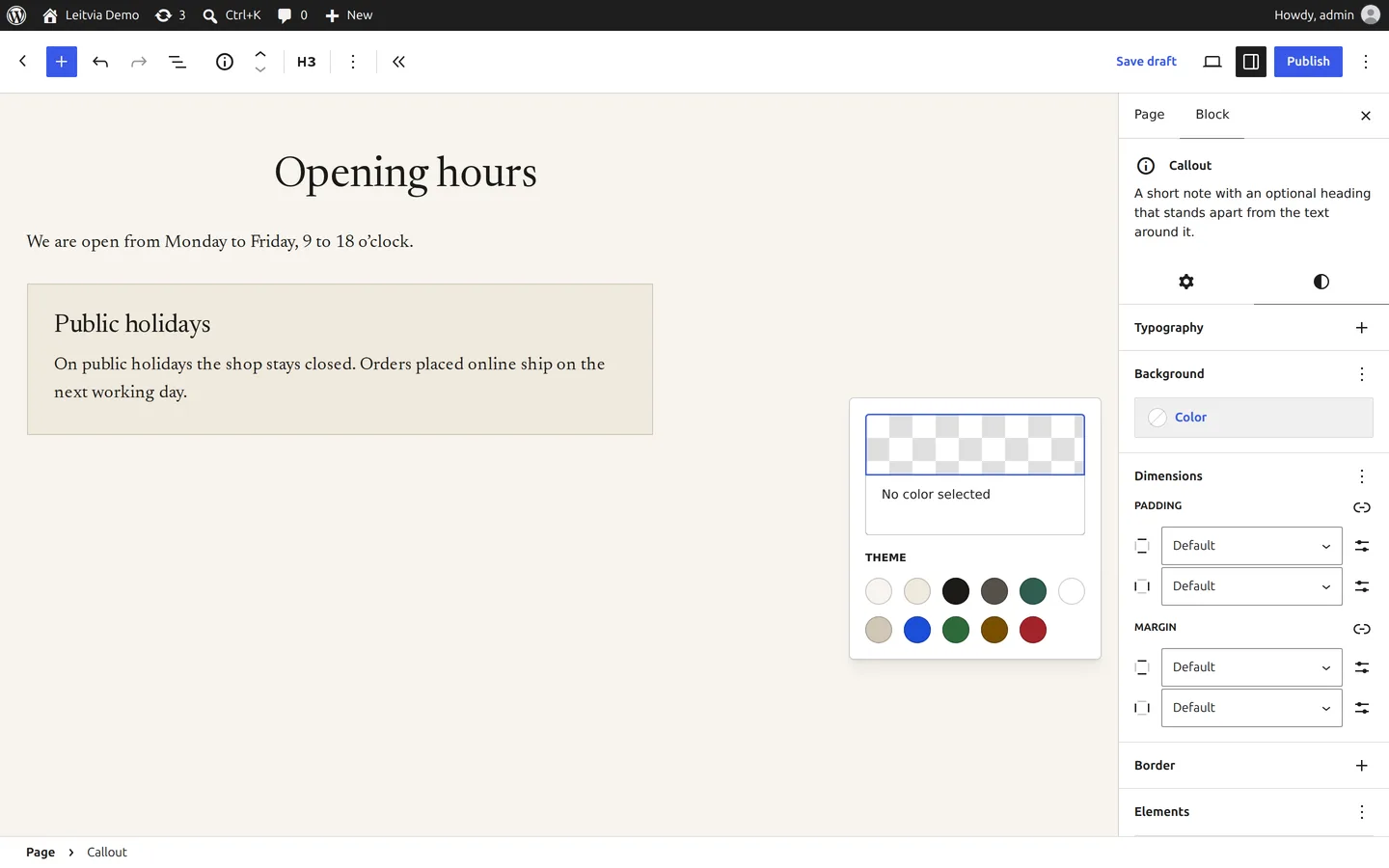
- Copy the plugin folder, rename it and replace the slug
leitvia-block-starter, the prefixleitvia_block_starterand the package name in every file. - Rename the block folder under
src/blocks/and setnameinblock.json. The name is stable API: once content uses the block, it never changes. - Run
npm installandnpm run build. The build writesbuild/blocks-manifest.php, and the plugin registers every block in it withwp_register_block_types_from_metadata_collection(). A new block is a new folder; PHP needs no change. - Keep the attributes few and typed. Colors, spacing, typography and border come from
supports, so the editor offers the presets of the theme. - Render in
render.phpwithget_block_wrapper_attributes()and late escaping. A dynamic block can change its markup with every release without invalid blocks in saved content. - Test with PHPUnit, PHPCS, PHPStan and Plugin Check, then insert the block in the editor, save and reload.
The block.json of the example asks the theme for everything visual:
{
  "apiVersion": 3,
  "name": "leitvia-block-starter/callout",
  "attributes": {
    "heading": { "type": "string", "default": "" },
    "level": { "type": "integer", "enum": [ 2, 3, 4, 5, 6 ], "default": 2 },
    "text": { "type": "string", "default": "" }
  },
  "supports": {
    "html": false,
    "color": { "background": true, "text": true, "link": true },
    "spacing": { "margin": true, "padding": true },
    "typography": { "fontSize": true, "lineHeight": true },
    "__experimentalBorder": { "color": true, "radius": true, "style": true, "width": true }
  },
  "render": "file:./render.php"
}Its stylesheet sets defaults only, in :where() so choices in the editor always win, with the Leitvia role first and the core slug as fallback for other themes:
:where(.wp-block-leitvia-block-starter-callout) {
  padding: var(--wp--preset--spacing--m, var(--wp--preset--spacing--40, 1.5rem));
  border: thin solid var(--wp--preset--color--stroke, currentColor);
  background-color: var(--wp--preset--color--surface-alt, var(--wp--preset--color--tertiary, transparent));
  color: var(--wp--preset--color--ink, var(--wp--preset--color--contrast, inherit));
}Agents that work on a block plugin follow the WordPress skill wp-block-development, and wp-interactivity-api for behavior on the front end. The README of the starter adds the Leitvia rules in eleven steps, from renaming to the release zip.
Checks before you ship
- Every REST route of Studio describes its answer:
OPTIONSon a route returns its schema, and write routes validate their arguments before the callback runs. - Every ability carries complete annotations and a description for each required field, as the WordPress skill
wp-abilities-verifyexpects. - Markup passes the token lint: roles only, no hex, no
px, no unknown preset. The Pattern Lab shows the result of each pattern. - Plugin code passes PHPCS with the WordPress Coding Standards, PHPStan level 8 and Plugin Check; theme code passes Theme Check.
- Pages pass axe for WCAG 2.2 AA and the BITV 2.0 steps that a test can check. What only a person can test stays on the list of your review.
Source and releases
- Theme Leitvia with
design.mdandleitvia-contract.json - Leitvia Studio with
docs/extension-api.md - Leitvia Child
- Leitvia Block Starter
- Leitvia Skills with the agent handbook
- WordPress/agent-skills, the official skills of WordPress
- Changelog of all packages